

In Part 2, we built a working semantic search tool with Chroma — it takes a natural-language query and retrieves the most relevant notes. That’s genuinely useful, but it’s only half of what most people mean when they say “RAG.” This article adds the other half: an LLM that reads the retrieved notes and generates a grounded, cited answer instead of just handing back a list of matching documents.
Background: what RAG is actually solving
Retrieval-Augmented Generation, or RAG, addresses a specific and fairly narrow problem. LLMs are trained on a fixed snapshot of the world, so they know nothing about your private documents, your team’s internal wiki, or anything that happened after their training cutoff. RAG doesn’t fix this by retraining the model — that would be slow and expensive to repeat every time your documents change. Instead, it retrieves relevant context at query time and puts it directly into the prompt, so the model answers using facts you hand it, rather than relying purely on what it memorized during training. This is also why RAG tends to reduce hallucination: the model has less need to guess when the right facts are already sitting in its context window.
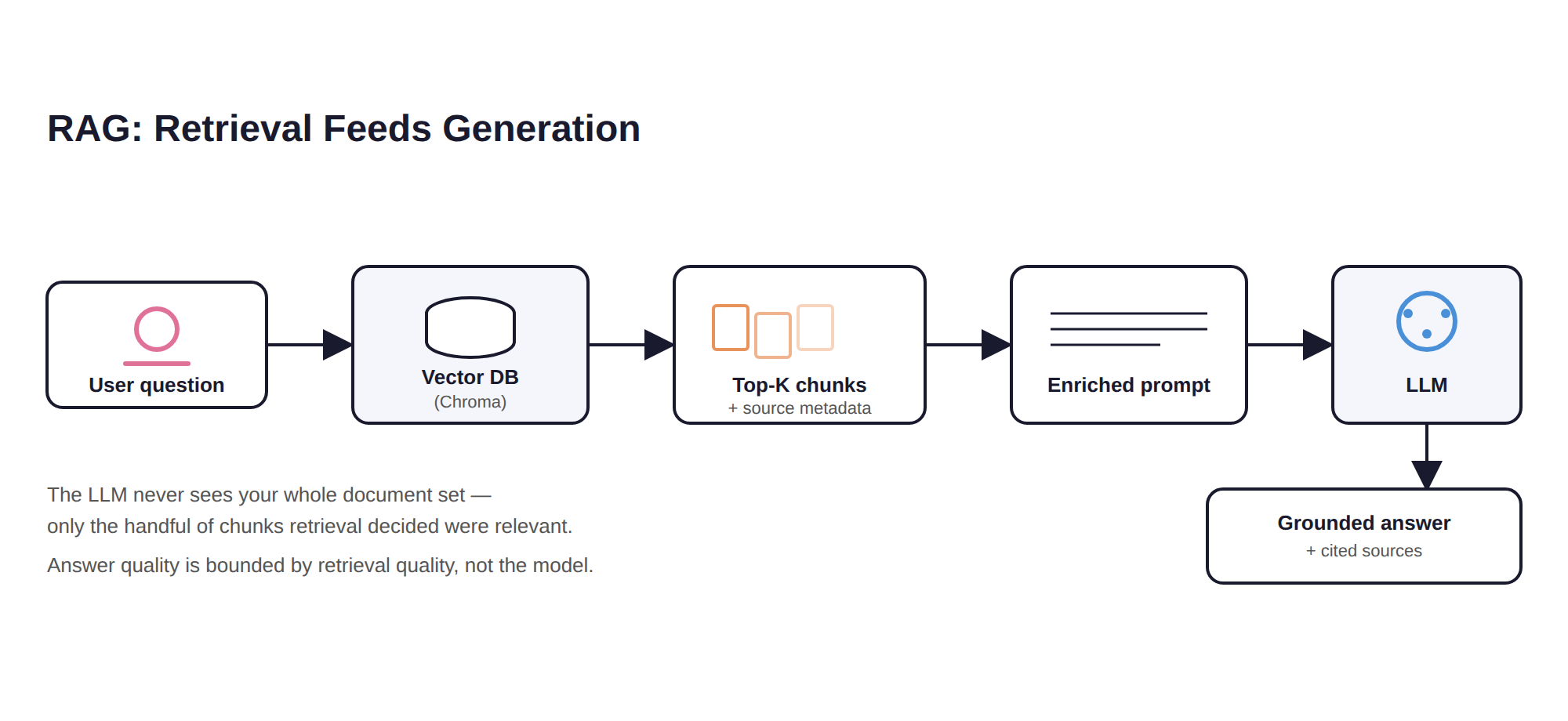
Here’s the full pipeline we’re building toward in this article, going back to the hybrid diagram that started this series:
User Query → Embed → Vector Search → Top-K Chunks → Enriched Context → LLM → Response
We already built the first three steps of this in Part 2. Let’s build the rest.
Understanding the concept: why chunking matters
In Part 2, we indexed whole .txt files as single documents, which worked fine because the notes were short. That approach breaks down once documents get longer. A twenty-page PDF embedded as a single vector produces a mushy, unfocused representation of everything the document contains — and worse, if a user asks about one paragraph on page 14, you’d retrieve the entire twenty-page document as “context,” burning tokens and diluting relevance in the process.
The fix is chunking: splitting long documents into smaller, semantically coherent pieces — typically somewhere between 200 and 800 tokens — and embedding each piece separately. A simple, effective starting point is a fixed-size sliding window with overlap:
def chunk_text(text: str, chunk_size: int = 500, overlap: int = 50): """Splits text into overlapping chunks, roughly by character count. The overlap exists so a sentence doesn't get cut in half between two chunks and lose its meaning in both of them.""" chunks = [] start = 0 while start < len(text): end = start + chunk_size chunks.append(text[start:end]) start = end - overlap return chunks
For production use, chunking on sentence or paragraph boundaries tends to work better than raw character counts — libraries like LangChain’s RecursiveCharacterTextSplitter do this for you out of the box. We’re keeping it simple here so the underlying mechanics stay visible rather than hidden behind a library call.
Indexing chunked documents in Chroma
Let’s extend the indexing script from Part 2 to chunk documents before embedding them, and track which original file each chunk came from — we’ll need that later for citations.
import osimport chromadbdef chunk_text(text: str, chunk_size: int = 500, overlap: int = 50): chunks = [] start = 0 while start < len(text): end = start + chunk_size chunk = text[start:end].strip() if chunk: chunks.append(chunk) start = end - overlap return chunksdef build_index(docs_dir: str, db_path: str = "./rag_db"): client = chromadb.PersistentClient(path=db_path) collection = client.get_or_create_collection(name="rag_docs") documents, ids, metadatas = [], [], [] for filename in os.listdir(docs_dir): if not filename.endswith(".txt"): continue with open(os.path.join(docs_dir, filename), "r", encoding="utf-8") as f: content = f.read() for i, chunk in enumerate(chunk_text(content)): documents.append(chunk) ids.append(f"{filename}::chunk{i}") metadatas.append({"source": filename, "chunk_index": i}) if documents: collection.upsert(documents=documents, ids=ids, metadatas=metadatas) print(f"Indexed {len(documents)} chunks from '{docs_dir}'") return collection
Retrieving and assembling context
Given a user question, we retrieve the top-k most relevant chunks and format them into a context block the LLM can read — while keeping track of which source file each chunk came from, so we can cite it later:
def retrieve_context(collection, query: str, n_results: int = 4): results = collection.query(query_texts=[query], n_results=n_results) chunks = results["documents"][0] sources = results["metadatas"][0] context_block = "\n\n".join( f"[Source: {src['source']}, chunk {src['chunk_index']}]\n{chunk}" for chunk, src in zip(chunks, sources) ) return context_block, sources
Generating a grounded answer
Now let’s connect this to an LLM. The pattern below uses Anthropic’s API, but the same structure applies to any chat-completions-style API — the client and a couple of lines change, the logic doesn’t.
import anthropicclient = anthropic.Anthropic(api_key="YOUR_ANTHROPIC_API_KEY")RAG_PROMPT_TEMPLATE = """You are a helpful assistant answering questions using ONLY the context provided below.- If the answer is present in the context, answer clearly and cite the source file(s) you used.- If the context does not contain enough information to answer, say so explicitly instead of guessing.- Do not use any outside knowledge beyond what's in the context.Context:{context}Question: {question}Answer:"""def answer_question(collection, question: str, n_results: int = 4): context, sources = retrieve_context(collection, question, n_results) prompt = RAG_PROMPT_TEMPLATE.format(context=context, question=question) response = client.messages.create( model="claude-sonnet-4-5", max_tokens=1024, messages=[{"role": "user", "content": prompt}], ) answer = response.content[0].text cited_files = sorted(set(s["source"] for s in sources)) return answer, cited_files
That one instruction in the system prompt — “if the context does not contain enough information, say so explicitly instead of guessing” — is doing more work than it looks like it’s doing. It’s the single highest-leverage sentence in a RAG prompt for controlling hallucination, because it gives the model explicit permission to say “I don’t know” instead of producing a plausible-sounding answer pulled from its training data rather than your documents.
Putting it together into a working CLI
if __name__ == "__main__": import sys client_db = chromadb.PersistentClient(path="./rag_db") collection = client_db.get_or_create_collection(name="rag_docs") if len(sys.argv) > 1 and sys.argv[1] == "--index": build_index("./docs") else: question = input("Ask a question about your documents: ") answer, cited_files = answer_question(collection, question) print(f"\n{answer}\n") print(f"Sources: {', '.join(cited_files)}")
Try this against a small set of files — a project’s design doc, a meeting notes file, and a README, say — and ask a question that requires pulling facts from more than one of them. If retrieval is working well, the model’s answer should draw on all the relevant chunks and cite each source file it actually used, not just the first one it happened to see.
Why RAG quality lives or dies at retrieval, not generation
Here’s a subtlety worth internalizing early, because it changes where you spend your debugging effort. When a RAG system gives a wrong or incomplete answer, the instinctive reaction is to blame the LLM. In practice, the far more common cause is retrieval failure — the vector search step simply didn’t surface the chunk that contained the answer, so the LLM is doing its best with incomplete material. Generation quality is bounded above by retrieval quality. No amount of prompt engineering fixes a context block that’s missing the answer in the first place.
That’s why the two levers worth tuning first, in this order, are:
- Chunk size and boundaries. Chunks that are too large dilute relevance; chunks that are too small lose the surrounding context that gives them meaning. Splitting on natural boundaries — paragraphs, sections — usually beats fixed character counts.
- Number of retrieved chunks, and reranking. Retrieve too few, and you risk missing the answer entirely. Retrieve too many, and you add noise while burning context-window budget on chunks that don’t help. Production systems often retrieve a larger candidate set than they need — say, the top 20 — and then run a separate, more precise reranking model to narrow that down to the 3 to 5 chunks that actually go into the LLM’s context.
We’ll cover retrieval tuning, hybrid search, and reranking properly in Part 4, alongside what changes when this pipeline needs to handle real production traffic instead of a single script running on your laptop.
What you’ve built
You now have a complete, working RAG pipeline. Documents get chunked and embedded into Chroma, a user question triggers semantic retrieval of the most relevant chunks, and an LLM generates an answer that’s grounded in — and cites — your own content. This is structurally the same pattern used by production systems like customer support copilots and internal knowledge-base assistants. The difference between what you’ve built here and those systems is mostly a matter of scale, monitoring, and retrieval sophistication, which is exactly where Part 4 picks up.
Series roadmap:
- Part 1: Fundamentals — embeddings, similarity, how vector search works
- Part 2: Hands-on — build a working semantic search tool with Chroma
- Part 3 (this article): Build a full RAG Q&A pipeline over your own documents
- Part 4: Production, scaling, indexing internals, and hybrid vector + graph systems


